
In the Heat Pumps section of the Back office you can add/edit/delete/disable 3 types of equipment:
- Heat pumps
- Extras (refers to several types of instrumentation, domestic hot water tanks included) and kits of extras
- Emitters
1. Heat Pumps
You can either import the equipment from our master catalogue, or create from scratch. The master catalogue is a set of equipment that are mantained by Effizency team, by observing the market and making sure the most relevant models are readily able to be added to the platform to be used in surveys.
The first option is much quicker as all equipment parameters are already pre-filled, and you just need to set a cost (note: this is "cost to you", you cand add your own margins in a per per design/quote basis).
However, there can be cases when your own equipment is not available in the master catalogue, hence the "create from scratch" option. If you choose to create from scratch, you need not only to insert cost but also all the technical details, SCOPs for different flow temperatures and heating power for different conditions.
Check out this video on how to add heat pumps using both approaches.
2. Extras
You can also import domestic hot water (DHW) tanks from our master catalogue in the Extras section. If you follow this route, you don't need to specify the compatibility with the heat pump as that is already assured in the master catalogue data.
Again, if you choose to create from scratch, you will need to specify the compatibility between DHW tank and the heat pump. For extras of any other type, you can choose 2 options:
- don't specify compatibility: the extra will be available for all heat pumps during design stage.
- specify compatibility: the extra will only be available in design for the compatible heat pumps you've specified.
3. Kit of Extras
The "Manage Kits" feature allows users to create and manage extras kits for heat pumps (HPs). Through a dedicated interface, users can group compatible extras into kits and associate them with corresponding heat pumps.
The "Manage Kits" button will be available only when at least one extra has been added to the system. Before that, the button will remain disabled.
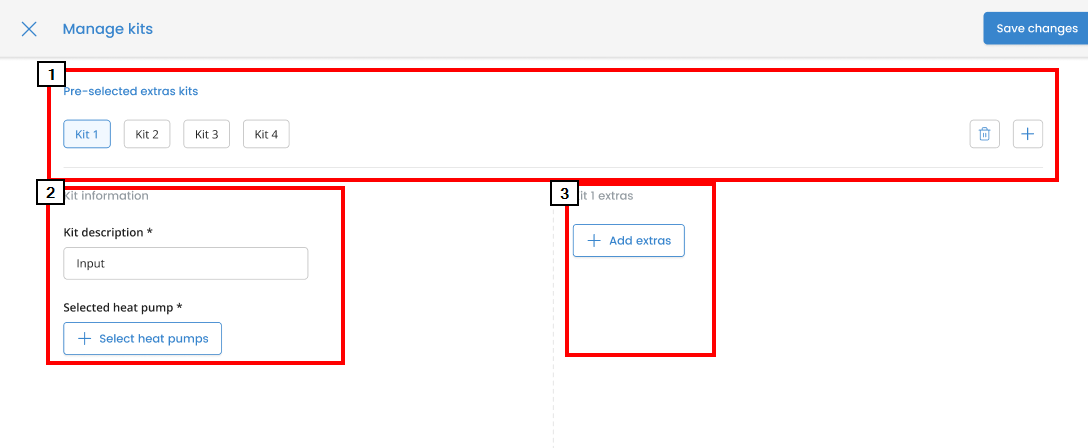
Structure of the Kit Management Pop-up
Pre-selected Extras Kits: Allows adding and removing existing kits.
Kit Description & Selected Heat Pump: Allows defining a name/description for the kit and selecting which heat pumps are compatible.
Add Extras: Allows adding extras to the kit, provided they are compatible with all selected heat pumps or are not specific to a single heat pump.
Rules for Creating Kits
To create a kit, at least one compatible heat pump and one associated extra are required.
Each kit can have a unique set of compatible heat pumps.
The extras available for selection must be compatible with all selected heat pumps.
4. Emitters
You can also add 3 types of emitters: radiators, fan coils and underfloor heating pipe sizes. Again, import from catalogue option is also available.
Keep in mind that for the specific case of UFH, only pipe sizes that haven't been already added are available in the list.